













 Fabian
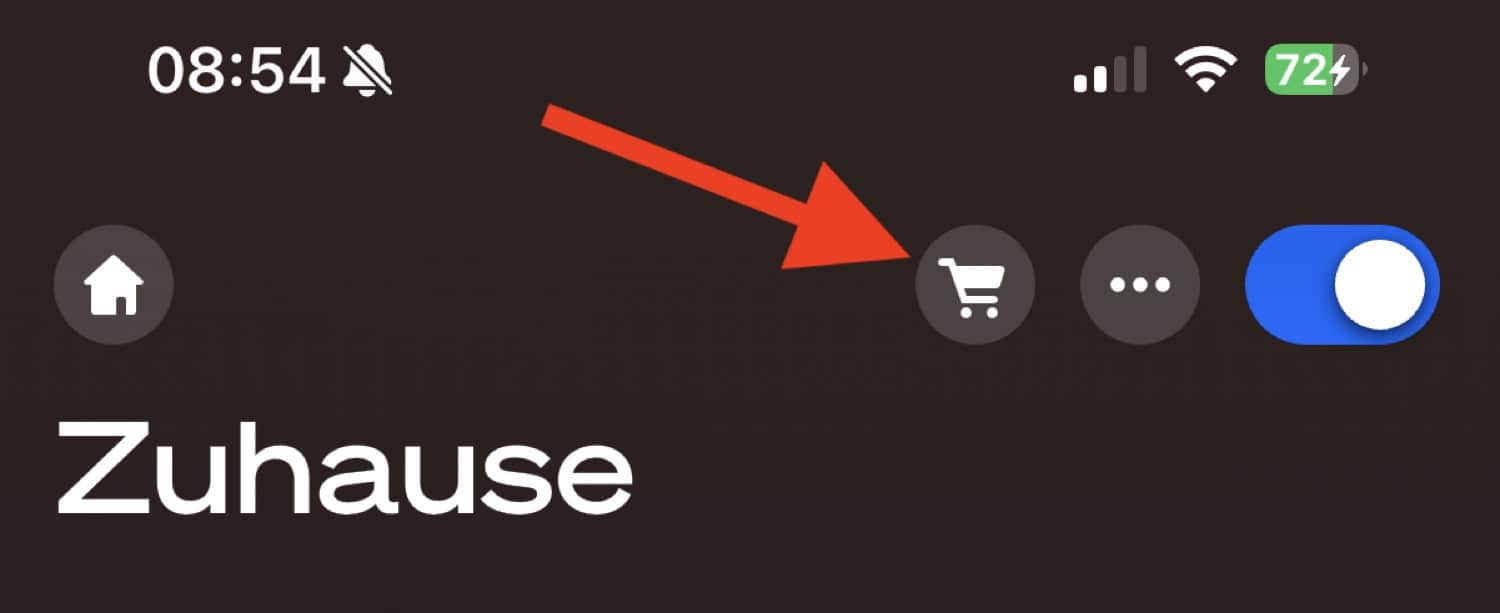
With version 5.60.1 of the Hue app, Philips Hue has introduced far more new features than officially announced. I have already reported on the multilingual Hue AI Assistant, the new features for the doorbell, and the customized room view. Now, Hueblog reader David has brought a small detail to my attention: a shopping cart icon has appeared on the Hue app’s home screen, to the right of the main switch for the entire home.
Philips Hue wants to use this shopping cart icon to take you directly to a version of its online store that is optimized for mobile devices. This raises the question: Is this a practical shortcut or just annoying advertising?
How to deactivate the shopping cart icon
If you don’t want this icon, which may be completely useless to you, you can fortunately deactivate it. Simply open the settings in the Hue app and tap on “App Settings.” There you will find the item “Hue Shop Shortcut.”
Once you have deactivated this menu item, the shopping cart icon will disappear from the Hue app’s home screen and you can use the app without interruption.


A small note on my own behalf
Finally, I would like to take this opportunity to make a small note on my own behalf. In order to run this blog, I am of course dependent on income. However, there are only very discreet advertising banners, as I myself have no desire for flashing websites full of distractions.
The main source of income for the Hueblog is affiliate revenue. These are small commissions that I receive when you click on a link in one of my articles and then make a purchase. This could be directly from Philips Hue, Amazon, or another store. Therefore, I am naturally delighted when you go shopping directly from my articles. This way, we can work together to ensure that you continue to receive the best information about Philips Hue in the future.


It is clearly annoying ad which rotten the UX !
Thanks a lot for pointing to the useful option to disable it, really appreciated.
It is clearly annoying ad which rotten the UX !
Thanks a lot for pointing to the useful option to disable it, really appreciated.